Welcome to Wevion — What It Is and Who It's For
Last updated: April 18, 2026
Wevion is a Meta Ads management platform built for media buyers who need to launch, manage, and optimize campaigns at scale — without spending their entire day clicking through the native Ads Manager.
Prerequisites
No prerequisites — this is the starting point for all new users
What Is Wevion?
Wevion is a web-based platform that connects directly to your Meta (Facebook and Instagram) advertising accounts and gives you a single workspace to control everything: campaign creation, performance monitoring, automation, creative generation, and team collaboration.
Instead of juggling multiple browser tabs, spreadsheets, and Business Managers, you connect your Meta accounts to Wevion once, and the platform imports all your ad accounts, pages, pixels, and catalogs automatically. From that point on, you manage your entire advertising operation from one dashboard.
The platform syncs with Meta's advertising infrastructure in real time, so every change you make in Wevion is reflected on Facebook and Instagram, and every performance metric from Meta flows back into your Wevion dashboard. Data refreshes happen every 15 minutes, which means you are always looking at current numbers — not yesterday's export.
Wevion is not a replacement for Meta's ad platform. It is a layer on top of it. Your ads still run on Meta. Your billing with Meta stays the same. Wevion simply gives you better tools to manage the work.
Who Is Wevion For?
Wevion is designed for people who buy media professionally. If you run ads on Meta as a core part of your work — not as a side project — this platform was built for you.
Freelance media buyers managing multiple clients from one workspace. Performance marketing agencies launching at volume (200+ campaigns in minutes via Campaign Launcher). Affiliate marketers who need speed, scale, and automation rules to catch underperformers. In-house marketing teams wanting role-based access control and collaboration.
Wevion starts to pay for itself when the volume and complexity of your operations outgrow Meta's built-in tools.
Key Features at a Glance
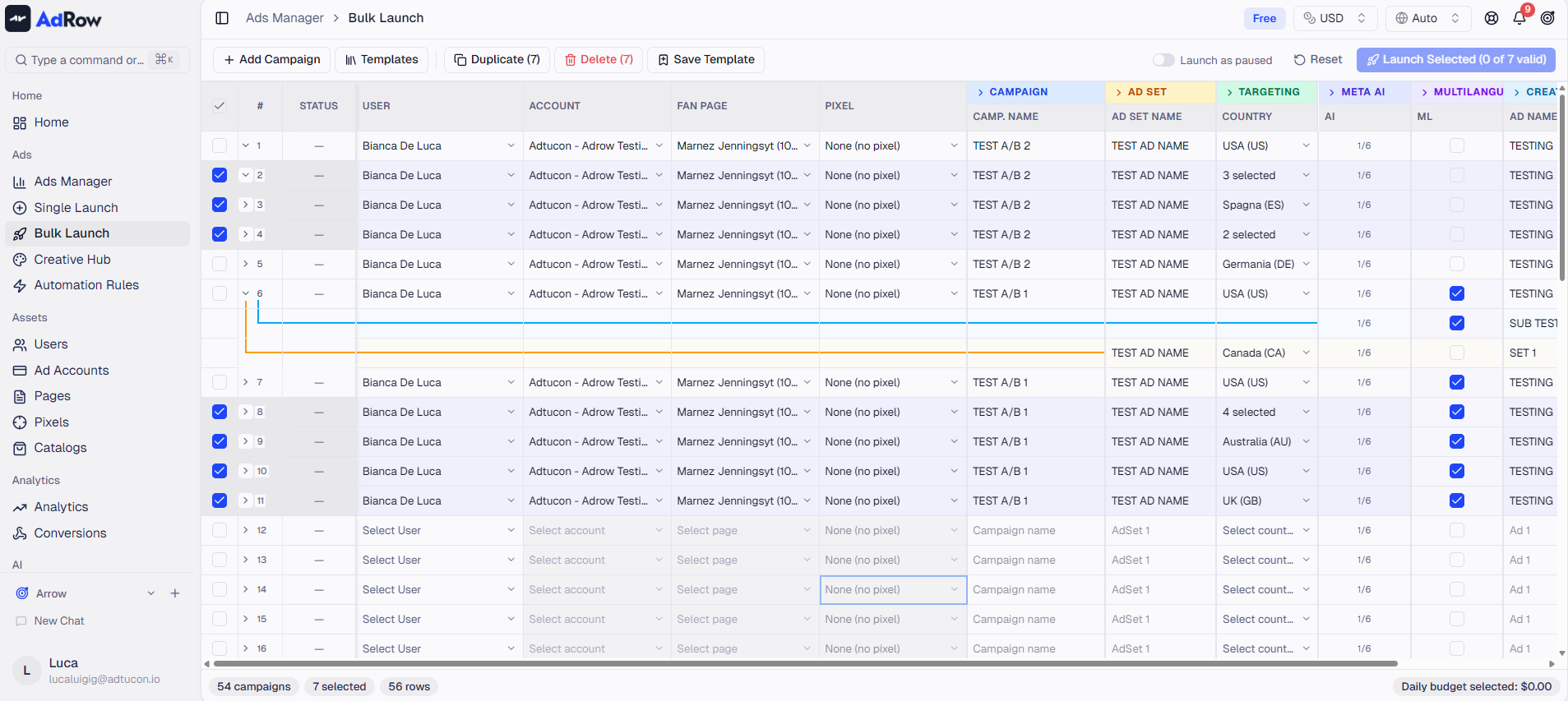
Campaign Launcher
Build and deploy campaigns using a spreadsheet-style grid. Define objective, budget, audiences, placements, and creatives in rows and columns. Wevion publishes all combinations in parallel.
Ads Manager
View and edit all your live campaigns, ad sets, and ads across every connected ad account in one unified table. Filter, sort, bulk-edit budgets, toggle statuses, and apply naming conventions — all without switching between Business Managers.
Dashboard and Real-Time Metrics
Your personalized dashboard shows aggregated performance across all connected accounts. Key metrics (spend, revenue, ROAS, CPA, CPM, CTR) update throughout the day. Multi-currency support with daily exchange rate conversion means accounts in different currencies display in whichever currency you choose.
Automation Rules
Create rules that monitor campaigns and act automatically. Set conditions (CPA above threshold, ROAS below target) and define actions (pause, adjust budget, send alert). Supports AND/OR logic and time-based triggers. Every execution is logged.
Creative Hub
Generate ad creatives directly inside Wevion using AI-powered tools. The Creative Hub includes image generation, video creation, AI avatar generation, voiceover synthesis, and automated compositing. Creatives are stored in your connected Google Drive and can be deployed directly into campaigns through the Launcher.
Team Management
Invite team members with role-based permissions (Owner, Manager, Media Buyer, Viewer). Data is isolated by session.
Notifications and Alerts
Real-time notifications via Telegram, email, or in-app. Get alerted when rules fire, budgets hit limits, or performance crosses thresholds.
Reporting and Export
Cross-account reports with CSV export for client reporting or internal analysis.
Available Plans
Wevion offers three subscription tiers. All plans include a 14-day free trial so you can explore the platform before committing.
Starter | Pro | Agency | |
Monthly price | $79/mo | $199/mo | $499/mo |
Annual price | $758/yr (~$63/mo) | $1,910/yr (~$159/mo) | $4,790/yr (~$399/mo) |
Ad accounts | Up to 5 | Up to 25 | Unlimited |
Team members | 2 included | 5 included | 15 included |
Ad spend limit | Up to $25,000/mo | Up to $100,000/mo | Unlimited |
Fan pages | 5 | 25 | Unlimited |
Pixels | 5 | 25 | Unlimited |
Catalogs | 1 | 10 | Unlimited |
Extra user cost | $19/mo per user | $15/mo per user | $12/mo per user |
Campaigns | Unlimited | Unlimited | Unlimited |
Automation rules | Basic | Advanced | Advanced + custom |
AI Creative Hub | -- | Included | Included |
Bulk operations | -- | Included | Included |
Support | Email (24h) | Priority (4h) | Dedicated account manager |
Reporting | Standard | Advanced | Custom + white-label |
Custom integrations | -- | -- | Included |
SLA | -- | -- | Included |
Annual billing saves approximately 20%, equivalent to getting two months free. All plans allow adding extra team members for an additional per-user fee.
Start your 14-day free trial — no credit card required.
Creating Your Account and Starting the Free Trial
Supported Languages
Wevion's interface is available in 19 languages:
English, Italian, Spanish, French, German, Portuguese, Japanese, Russian, Chinese, Korean, Arabic, Hindi, Indonesian, Polish, Romanian, Serbian, Thai, Turkish, and Ukrainian.
You can switch languages at any time from your account settings. The platform defaults to your browser's language if it is supported, otherwise it falls back to English.
Getting Started
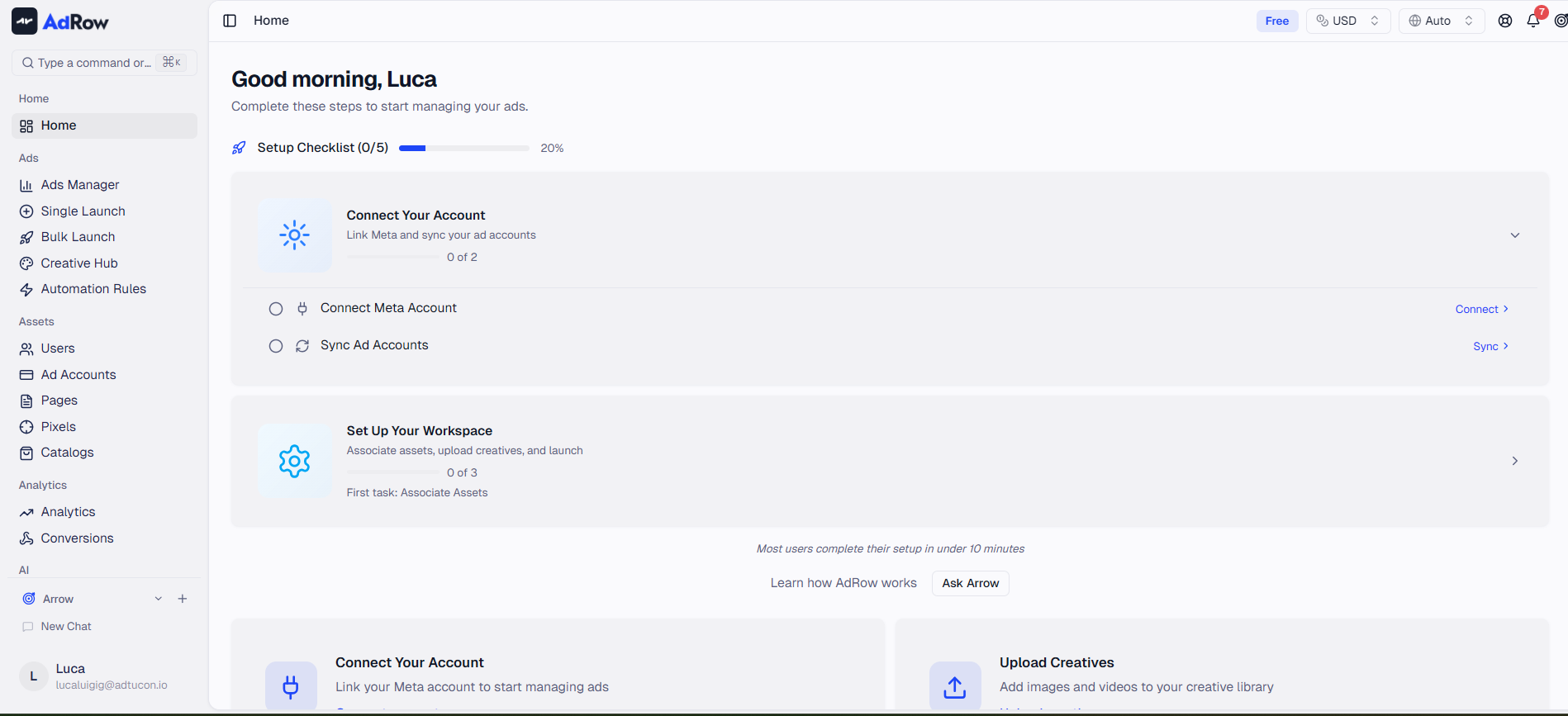
When you first sign in to Wevion, a setup checklist guides you through the key steps to get your workspace ready:
Connect your Meta account — Takes ~60 seconds via Meta's secure OAuth flow. Connecting Your Meta (Facebook) Account
Sync your ad accounts — Wevion imports all accounts; you choose which to activate.
Upload creatives — Add images and videos to your creative library.
Associate assets — Link pages, pixels, and catalogs to ad accounts.
Launch your first campaign — Use the Campaign Launcher grid interface.
The entire process takes 10-15 minutes.
Frequently Asked Questions
Do I need a Meta Business Manager to use Wevion? Yes. Wevion connects to Meta through your Business Manager. You need admin access to at least one Meta Business Manager that contains the ad accounts you want to manage.
Will Wevion affect my existing campaigns? No. Connecting Wevion does not modify any of your running campaigns. It imports your account structure and performance data in read-only mode until you explicitly make changes through Wevion.
Can I manage multiple Business Managers? Yes. You can connect multiple Meta accounts, each linked to different Business Managers, and manage them all from a single Wevion workspace.
Is my data shared between team members? Data access is controlled by roles. Each team member only sees the accounts and campaigns they are authorized to access. Account-level data isolation is enforced at the platform level, not just the interface.
What happens after the free trial ends? If you do not subscribe, your account enters a read-only state. Your data is preserved, and you can reactivate at any time by choosing a plan. Nothing is deleted.
Can I switch plans later? Yes. You can upgrade or downgrade your plan at any time from the Billing section in your account settings. Upgrades take effect immediately with no cooldown. Downgrades are subject to a 30-day cooldown, and if your current resources exceed the new plan's limits, you must remove excess resources before the downgrade is allowed.
Does Wevion work with Instagram ads? Yes. Since Instagram advertising is managed through Meta's ad platform, all Instagram campaigns are fully supported within Wevion.